
Efficient Sales Lead Tracking Sheet
Overview
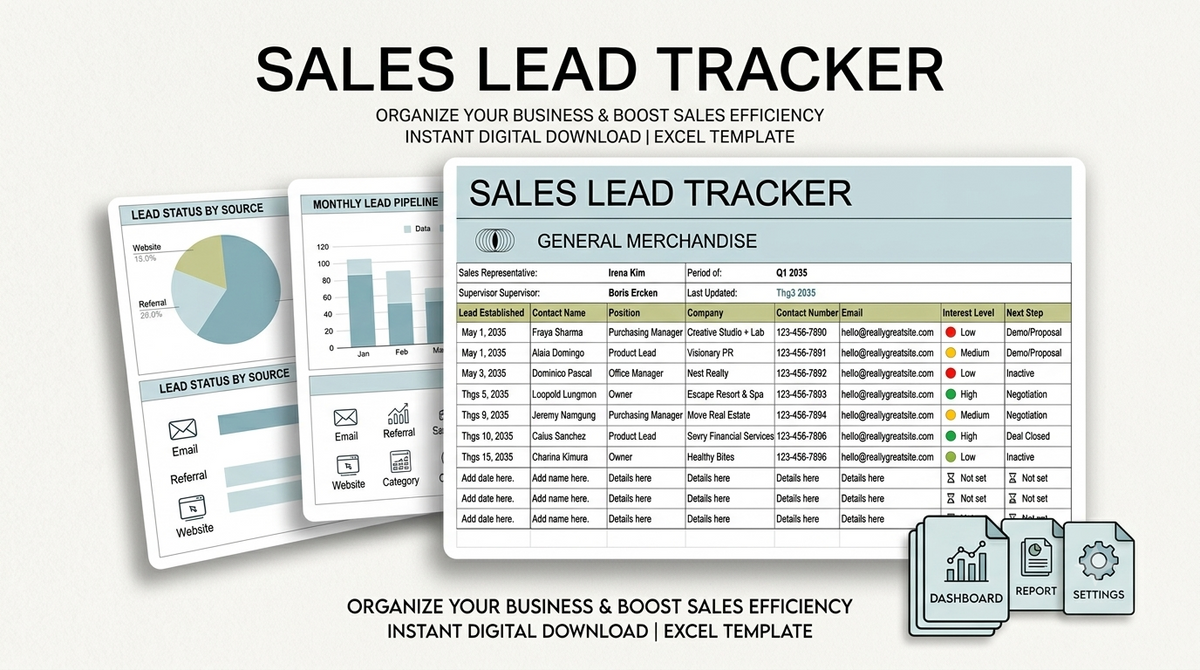
Elevate your sales pipeline with this eye-catching, minimalist lead tracking spreadsheet designed for effortless client management.
Featuring a clean, pastel-themed aesthetic, this tool combines functional structure with stylish design to help you organize and prioritize potential leads seamlessly.
Streamline your daily workflow with user-friendly data columns that make lead navigation, target tracking, and status updates clear and simple.
Designed for flexibility and ease, this spreadsheet is fully compatible with both Microsoft Excel and Google Sheets to keep your sales targets consistently on track.
Features
- Sleek, minimalist design enhanced with a soft pastel color theme
- Efficient lead management structure to organize, rank, and prioritize potential clients
- User-friendly column architecture for smooth, hassle-free data navigation
- Streamlined layout designed to keep sales targets clear and manageable
- Dual format compatibility for seamless use in Microsoft Excel and Google Sheets
- Fully customizable fields to adapt easily to your specific sales workflow
Pages
- Lead Management & Pipeline Tracking Dashboard
- Client Prioritization & Status Sheet
What's Included
- Customizable Sales Lead Tracking Template for Microsoft Excel
- Customizable Sales Lead Tracking Template for Google Sheets
- Pre-structured pastel layout with optimized tracking columns
Support
We offer reliable customer support to assist you with downloading, opening, and customizing your lead tracking template.
Our focus is ensuring you enjoy a seamless experience setting up your sales pipeline across your preferred platform.
Support Includes
- Assistance with accessing and saving files in Google Sheets or Microsoft Excel
- Basic guidance on customizing lead columns and prioritizing client data
- Troubleshooting file access or visual display issues
Support Does Not Include
- Bespoke sales strategy development or CRM integration consulting
- Advanced macro, VBA, or automated script programming
- Third-party application troubleshooting outside supported spreadsheet platforms
Customer reviews
No ratings yet.
Có thể bạn thích
Sản phẩm tương tự


Frequently asked questions
View all FAQsNo. You can install, customize, and launch with Shopify's visual editor. No coding experience is required. Our detailed documentation guides you through every step.
No. You can install, customize, and launch with Shopify's visual editor. No coding experience is required. Our detailed documentation guides you through every step.
Yes. Documentation, help center articles, and support tickets are available. Our team responds within 24 business hours for any technical questions.
No. You can install, customize, and launch with Shopify's visual editor. No coding experience is required.